
Custom Software for Medical Practices: Where Off-the-Shelf Falls Short
2026-10-02 · Appsoluty team
Custom software for medical practices usually means something much smaller than it sounds: one workflow, fixed, sitting next to the EHR and practice management system the clinic is already paying for. It doesn't mean ripping out Epic, athenahealth, or NextGen and starting over. That confusion is exactly why so many growing practices either overpay for a full platform rebuild they didn't need, or stay stuck inside a tool that's quietly costing them hours every week.
Why clinics outgrow off-the-shelf practice management software
Every EHR and practice management platform ships for the average practice: a single location, a handful of providers, standard visit types, and billing that fits whatever payer mix the vendor assumed. Most clinics fit that mold for years. Then a practice adds a second location, brings on a specialty provider, or builds a referral network, and the standard templates stop matching how the clinic actually runs.
A few patterns show up consistently in practices that have hit that ceiling:
- Front-desk staff keep a side spreadsheet for referrals or intake because the system can't track what actually needs tracking, the same pattern we see in practices still running intake or scheduling off spreadsheets instead of inside the EHR.
- A biller re-enters the same eligibility data in a payer portal every morning because the built-in check only runs overnight.
- A specialty provider, PT, dental, med-spa, behavioral health, works around a generic chart template that doesn't match their actual treatment plan.
- Reports across two or three locations get exported and stitched together by hand before every partner meeting.
- The vendor's answer to a workflow request is "that's not how the system works," and it's been that way for two years.
None of those are reasons to replace the EHR. They're reasons to fix one workflow.
The misconception to clear up first: "custom" doesn't mean "replace your EHR"
Search "custom software for medical practices" and almost every article assumes you're building a replacement for Epic, Cerner, or Meditech: a project priced and timelined for a hospital system, not a clinic. That's the wrong frame for the overwhelming majority of practices asking this question.
A single-location or small multi-location practice almost never needs to rebuild its EHR from scratch. What it needs is a scoped piece of software that solves the one workflow the EHR handles badly, while the EHR keeps doing everything else: scheduling, charting, e-prescribing, the core medical record. Think of it as a companion app, not a replacement platform.
That distinction changes cost, timeline, and risk. A full EHR rebuild is a far larger, multi-year commitment with real risk if the migration goes wrong. A scoped workflow fix is a project you can scope, price, and ship in months, and if it doesn't pan out, you haven't touched your system of record. A patient-facing navigation tool built to solve one specific friction point is a good example of what that companion app looks like in practice: narrow in scope, built to fix one friction point, and never touching the records platform underneath it.
Where off-the-shelf tools actually break down, workflow by workflow
The gap doesn't show up as one big failure. It shows up in five or six specific workflows, in slightly different ways depending on the tool. Here's where we see it most often, and what a scoped fix looks like for each.
| Workflow gap | Common off-the-shelf tool | Where it breaks down | Source | Scoped custom fix |
|---|---|---|---|---|
| Scheduling, intake, and reminders | AdvancedMD, athenahealth | Reminder logic doesn't flex by visit type or channel; separate reviewers report rigid billing workflows and bug fixes that make things worse after updates | Capterra reviewers' complaints about AdvancedMD's rigid billing flexibility and functionality getting worse after updates | A reminder and intake layer that reads and writes to the existing EHR through its API |
| Multi-location / multi-provider reporting | Built-in dashboards in athenahealth, NextGen, and similar platforms | Cross-location roll-ups don't match how a multi-site practice tracks provider productivity | the cost gap between buying and building a records platform | A reporting layer that pulls from each location's existing system and rolls it into one dashboard |
| Referral tracking and care coordination | Generic referral modules bundled into PM software | No closed-loop tracking; referrals stall in fax queues or email threads | the price tag spaceo quotes for a from-scratch ambulatory EHR build | A referral-tracking tool scoped to just that workflow, sitting next to the EHR |
| Specialty workflows (PT plans, med-spa intake, telehealth notes, dental treatment tracking) | Generic PM/EHR chart templates | Templates built for general practice don't hold specialty-specific fields or logic | the higher price range spaceo cites for a multi-specialty EHR build | A specialty workflow app built around how that provider actually documents care |
| Billing and insurance-eligibility checks | Built-in billing modules | Eligibility checks run on an overnight batch instead of in real time, so surprises surface at check-in | the typical price range knack quotes for custom healthcare app development | A real-time eligibility check wired into the clearinghouse feed |
Scheduling, intake, and patient reminders
The scheduling module in most EHR and PM platforms is built for appointment type and reminders, not for the quirks of a given visit. A practice running same-day sick visits, long-form intakes, and recall campaigns side by side usually needs three different reminder cadences, and the tool gives it one. Reviewers of platforms like this report two separate frustrations, as noted above: billing workflows that don't flex, and updates whose fixes end up breaking other things instead of improving them. Either way, the fix isn't switching vendors again. It's a thin scheduling and reminder layer that calls into the existing system's API, handles the cadence logic the vendor won't build, and leaves the core calendar exactly where it is.
Multi-location / multi-provider reporting
Ask a practice running three locations how they build a monthly productivity report and the honest answer is usually: export three files and stitch them together in a spreadsheet. The platform's reporting was built around a single location's dashboard, not a roll-up across sites and providers. That gap is often the first thing that tempts a practice to consider swapping platforms entirely, but full platform replacement, in either direction, is a much bigger commitment than a scoped fix: thinkitive's own cost comparison puts a 5-year off-the-shelf EHR total around $150,000 to $500,000-plus, more than its $80,000 to $300,000-plus range for a custom build over the same period, per the comparison cited above. A scoped reporting layer pulls from each location's existing export or API, normalizes the numbers, and gives whoever runs the practice one dashboard instead of three exports and an afternoon.
Referral tracking and care coordination
Referral tracking inside most PM software means a field for "referred to" and a status dropdown. It doesn't close the loop: track whether the specialist got the records, whether the patient showed up, whether a report came back. That gap is exactly why referral coordinators end up running a side spreadsheet or a shared inbox. A purpose-built referral tracker, scoped to just that workflow, closes the loop without asking the practice to migrate anything.
Specialty-specific workflows (PT plans, med-spa/aesthetic intake, mental health telehealth notes, dental treatment tracking)
A physical therapist documenting a treatment plan, a med-spa tracking consent and package credits, a therapist running telehealth notes under different documentation rules, and a dentist tracking a multi-visit treatment plan are all working against the same generic chart template. A provider-facing workflow app for managing daily treatment tasks is the kind of fix this calls for: software built around one provider type's actual workflow, running next to the EHR rather than replacing its chart.
Billing and insurance-eligibility checks
Most built-in eligibility checks run on an overnight batch against the payer, which means a patient's coverage can lapse or change between the batch run and the appointment. The front desk finds out at check-in, not before. A real-time eligibility check wired directly into the clearinghouse feed catches that gap before the patient is in the chair, and it's a narrow enough build that it doesn't touch the billing module itself.
What a scoped custom build realistically costs and takes
The numbers that show up most often online are enterprise numbers. A full custom EHR build, per spaceo's own published estimates, runs broadly from the low hundreds of thousands into the millions depending on scope and specialty count, with timelines stretching from months into years at the larger tiers. General custom healthcare app development, the range knack quotes, runs $50,000 to $500,000 over four to twelve months, which is wide because it spans everything from a single workflow tool to a full platform.
None of that is what a clinic fixing one workflow should expect to pay. A scoped build, say a referral tracker, a reminder layer, or a specialty intake tool, is a fraction of a full EHR project because it's touching one data flow, not rebuilding the medical record. There's no fixed phase-one number, because it depends on scope, but you get a real one before you commit: tasks get estimated in hours upfront at $70 an hour, so the projected cost is visible before anything starts, not quoted as a lump sum.
That's roughly how we scope projects like this: work priced at $70 an hour, estimated in hours before anything starts so the projected cost is visible up front, billed weekly against actual hours worked, and started within days of the first call once discovery and design are done. Milestone or hourly billing, whichever fits the project.
HIPAA and compliance: what changes when you build custom
Custom software touching patient data isn't HIPAA-compliant because you built it yourself, and it isn't non-compliant either. Compliance is a property of how it's built and operated, not of who wrote the code.
Building it in from day one costs real money. The compliance cost premium knack documents for healthcare app builds runs 20 to 30 percent on top of the base build. Retrofitting compliance into software that wasn't built for it is worse: the same source puts that at 40 to 80 percent of the original build cost, which is most of a second project. Build it compliant the first time.
In practice that means encryption at rest and in transit, audit logging on every record touch, access controls scoped to role, and a signed business associate agreement between the practice and whoever builds and hosts the software. The BAA is the part people forget: it's not a one-time signature. Whoever operates the software after launch, whether that's the practice's own IT, the vendor, or a hosting partner, is the party on the hook for the audit trail and breach-notification obligations the BAA assigns. Before you sign off on a custom build, get clear in writing on who holds that responsibility once the project ships, not just who built it.
Integrate, extend, or replace: a decision framework
Three options exist any time an EHR or PM workflow isn't working, and they're not interchangeable.
Integrating means pulling data out of the existing system through its API to power a report, dashboard, or check the platform doesn't natively run, without changing how staff use the EHR day to day. That's the right call for reporting gaps and eligibility checks.
Extending means building a companion app that handles one workflow end to end, a specialty chart or a referral tracker, and syncing it back to the EHR. That's the right call for specialty workflows and care coordination.
Replacing means migrating off the EHR entirely. That's rarely the right call for a single-location or small multi-location practice, even though it's the option every enterprise-focused article defaults to.
Start by asking which workflow is actually broken, not which platform is oldest. Most of the time, the answer is integrate or extend, not replace.
This isn't a pattern unique to healthcare. The same pattern shows up in construction, and the build-vs-buy calculus looks similar in logistics.
FAQ
Do I need to replace my EHR to get custom software?
No, and for most practices this is the wrong move. A custom build that solves one workflow, say referral tracking or specialty charting, sits next to your EHR and reads from or writes to it through its API. Full EHR replacement only makes sense at a scale and budget most clinics aren't operating at.
What does a realistic first phase of custom clinic software cost?
There's no fixed dollar figure, because it depends on the workflow's complexity and how much it needs to talk to your existing system, but it's a fraction of what a full EHR build runs. Tasks get estimated in hours upfront at $70 an hour, so you see the projected cost before committing to anything, rather than getting quoted a lump sum.
Is custom software HIPAA-compliant by default?
No. Compliance has to be built in: encryption, audit logging, access controls, and a signed business associate agreement with whoever builds and hosts it. Building it in from the start costs less than retrofitting it later.
Can custom software integrate with my existing EHR/PM system?
In most cases, yes. Most major EHR and PM platforms expose an API or an export process a custom tool can read from and write to, which is exactly how an integration or extension project gets scoped without disturbing the system of record.
Related projects
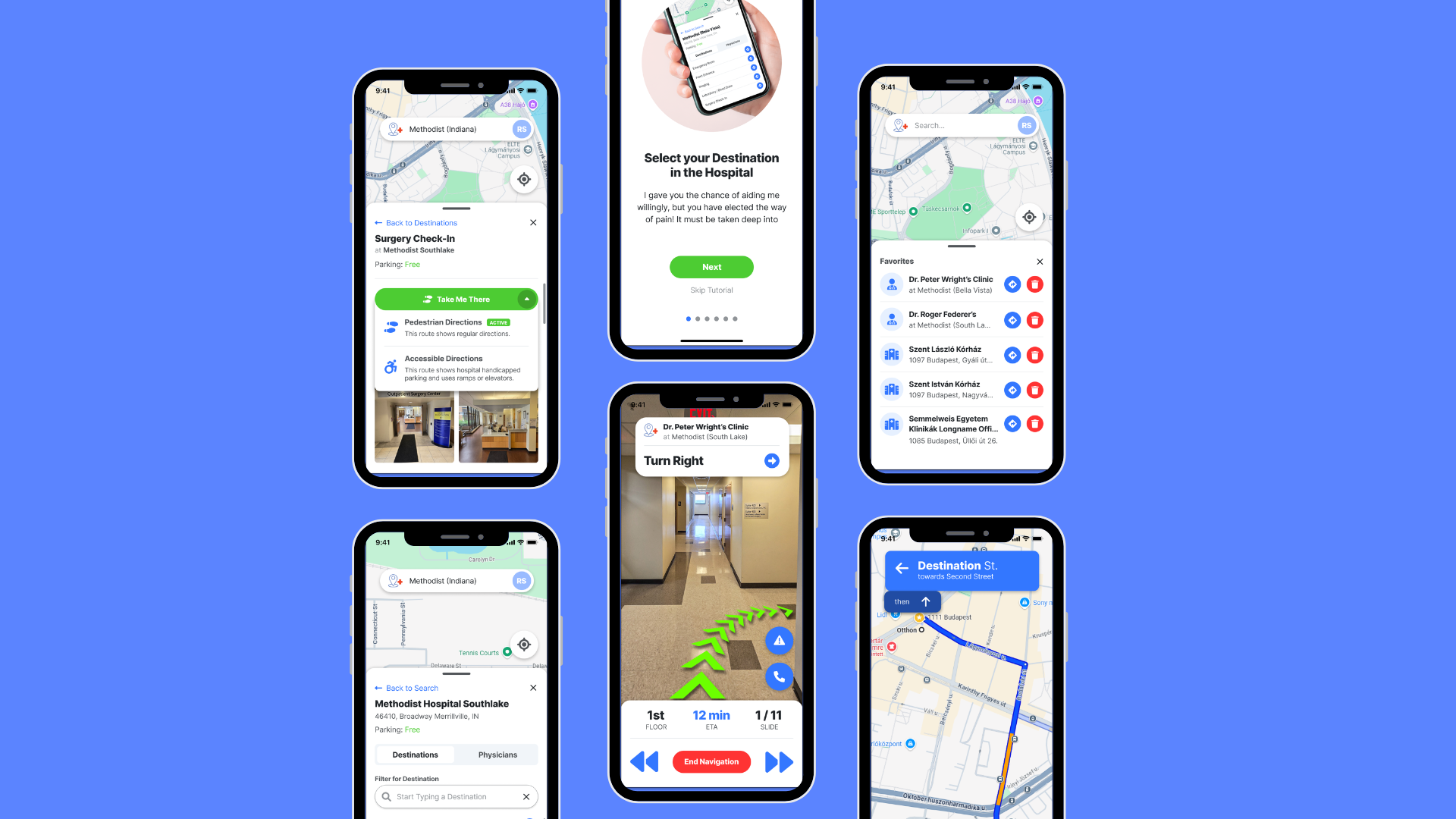
Discover My Doc | Health-care | Navigation
Discover My Doc is a healthcare navigation platform designed to help patients and visitors find their way to medical appointments with less stress and confusion. The app provides a smoother journey from arrival to destination, making hospital visits easier for patients, families, and healthcare providers.
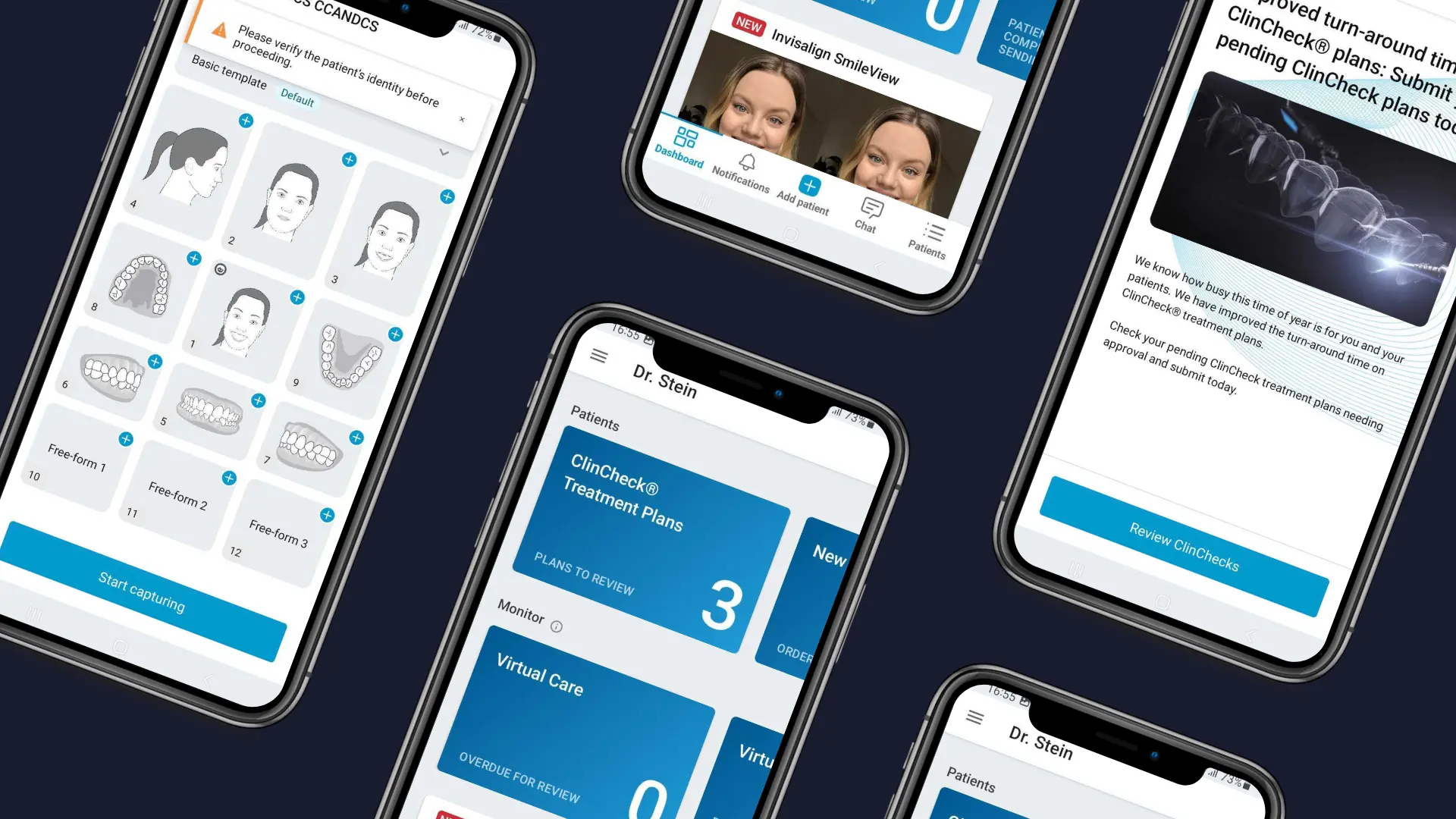
Invisalign | Healthcare app
Invisalign Practice App is a mobile app built for dentists and Invisalign providers to manage key treatment workflows directly from their phone. The app brings daily provider tasks into one place, including patient profile creation, photo capture, treatment monitoring, virtual appointments, alerts, and integration with the Invisalign Doctor Site.